

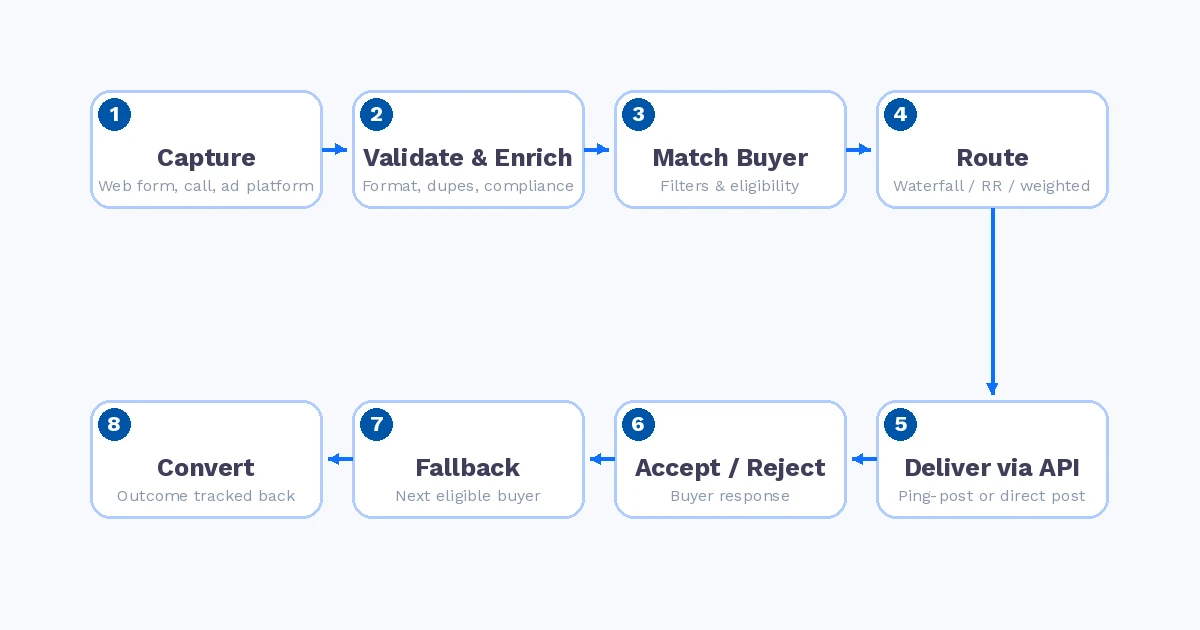
Lead distribution is the process of taking a lead that was just captured and getting it, automatically and in real time, to the external buyer best positioned to close it. That single sentence hides a lot of moving parts: validation, matching, routing rules, API delivery, acceptance logic, fallback paths, and tracking what actually happened after delivery.
It’s also a term that gets confused with something else almost every day: routing prospects to salespeople inside a CRM. The two share vocabulary, but they solve different problems. This guide covers what lead distribution actually involves, step by step, and where the line with CRM routing sits.
Lead Distribution vs. Lead Routing in a CRM
CRM lead routing assigns an inbound prospect to one of your own sales reps: round-robin to the sales team, by territory, by account owner. The lead stays inside one organization. The question is only “which rep handles this?”
Lead distribution sells or delivers a lead to one or more external buyers, other companies who pay for it. The question is “which buyer(s) are eligible, in what order, at what price, and what happens if the first one says no?” That means dealing with:
- Multiple buyers, each with their own filters, caps, and pricing
- Eligibility rules that vary per buyer (geography, vertical, exclusivity, business hours)
- A real transaction: acceptance, rejection, and a price attached to the outcome
- A full chain to track, from the source that generated the lead to the buyer that ultimately converted it
A lot of “lead management” content blends the two, which is why so much generic advice doesn’t hold up for lead generation companies, affiliate networks, and pay-per-call operations. If you’re selling leads to more than one buyer, you’re not doing CRM routing, you’re running a distribution operation, and it needs different infrastructure.
The Lead Distribution Pipeline, Step by Step
1. Capture
The lead enters the system: from a web form, a call, a landing page, or an ad platform integration (Google, Meta, Taboola, Outbrain, and similar sources). At this stage you’re just recording raw data: contact details, source, campaign, and whatever custom fields the vertical requires.
2. Validation and Enrichment
Before a lead is worth routing anywhere, it has to be checked. Validation covers phone and email format, duplicate detection against your own database and against suppression lists, and, depending on the vertical, compliance checks like TCPA consent verification. Enrichment adds data the raw submission didn’t include: normalized address, carrier lookup, demographic or firmographic data, sometimes a computed quality score. Leads that fail validation should be filtered out here, before they ever reach a buyer, since sending bad leads downstream is the fastest way to lose buyer trust.
3. Buyer Matching
With a clean, enriched lead in hand, the system determines which buyers can even receive it. This is a filtering step, not yet a routing decision: match the lead’s vertical, state or zip code, and any custom attributes against each buyer’s accepted criteria. A buyer who only takes leads from three states, or only during business hours, should never see a lead outside that scope in the first place.
4. Routing Rules
Among the buyers who qualify, routing rules decide the order and method of delivery. This is where the distribution model lives: waterfall/priority order, round robin, weighted distribution, ping-post auction, or a hybrid. It’s also where caps (daily, hourly, per-buyer) and pacing get enforced, so a buyer doesn’t get flooded past what they can handle or agreed to pay for.
5. Delivery via API
The lead is sent to the buyer’s system, typically a real-time API post (ping-post or direct post), sometimes a webhook, occasionally a CRM integration. Delivery has to happen in seconds: the value of a lead decays fast, and speed-to-lead is one of the biggest levers on conversion rate. This step also needs solid logging (request payload, response, timing), because it’s the first place things go wrong when they do.
6. Acceptance or Rejection
The buyer’s system responds: accept, reject, or sometimes a counter-offer (in an auction/ping-post model). A rejection isn’t necessarily final. It might mean the buyer is at cap, the data didn’t match their filters on their end, or their system timed out. What matters is that the response is captured and acted on immediately, not just logged and forgotten.
7. Fallback
If a buyer rejects, doesn’t respond, or errors out, the lead shouldn’t just die. Fallback routing sends it to the next eligible buyer in the chain automatically, based on the same routing model. This is arguably the difference between a distribution system and a simple webhook forwarder: a real distribution platform assumes the first attempt can fail and has a plan for it.
8. Conversion Tracking
Delivery and acceptance are not the finish line. What happens after (did the buyer actually contact the lead, qualify it, convert it, or return it) is the data that tells you whether your sources, your buyers, and your routing rules are actually working. Without outcome data feeding back into the system, you’re optimizing for “delivered” instead of “profitable,” which is a very different number.
Want to see multi-buyer routing, fallback, and conversion tracking running on your own leads? Try Vertikl free for 14 days and get your first campaign live in minutes.
Why Multi-Buyer Distribution Needs Different Infrastructure
A single-destination integration, one source, one buyer, one webhook, doesn’t need most of the above. The complexity shows up specifically when there’s more than one buyer in the mix: every additional buyer adds its own eligibility rules, its own cap and pricing logic, and its own point of failure that needs a fallback. Multiply that by multiple lead sources feeding in, and manually maintaining routing logic in spreadsheets or ad-hoc scripts stops being viable well before you’d expect.
This is the gap that dedicated lead distribution platforms are built to close: multi-buyer routing configured through rules rather than code, eligibility checks that run automatically before a lead ever reaches a buyer, and full visibility into every lead’s path, from the source it came from to the buyer that ultimately kept it.
What This Means in Practice
If your operation sells leads to more than one buyer, the questions worth asking about your current setup are simple: What happens when your top buyer rejects a lead? Does it go anywhere, or does it just get logged as lost? Can you see, per source and per buyer, what actually converted? And how much of your routing logic lives in someone’s head instead of in a system?
The rest of this series digs into the specific pieces: the routing models to choose between (waterfall, round robin, weighted, ping-post), where revenue quietly leaks out of a distribution pipeline, how to recover leads that would otherwise be lost, why buyer outcomes matter more than delivery status, and a full checklist for evaluating lead distribution software. Start with getting the pipeline above right, everything else builds on it.
Ready to stop losing leads to slow routing and dead-end rejections? Try Vertikl free and route your first lead today.